Table of Contents
ToggleThe Steam Deck’s vibrant 7-inch LCD display is a gateway to hundreds of games, but it’s also your device’s most vulnerable component. A single scratch, smudge, or crack can wreck the visual experience and tank your resale value. That’s why investing in a quality steam deck screen protector is non-negotiable if you’re serious about keeping your handheld in pristine condition. Whether you’re a casual player who docks their Deck at home or a road warrior who games on commutes and flights, the right protector makes all the difference. In this guide, we’ll walk through everything you need to know, from why protection matters to installation techniques, top product recommendations, and common pitfalls to avoid.
Key Takeaways
- A quality steam deck screen protector acts as a sacrificial layer to prevent permanent damage from scratches, dust, and impacts while maintaining screen clarity and touch responsiveness.
- Tempered glass protectors ($20–$40) offer superior durability and clarity, while budget-friendly film protectors ($5–$15) provide adequate protection for casual players at a fraction of the cost.
- Proper installation in a clean environment with distilled water and gentle pressure is essential—rushing the process or working in dusty conditions leads to bubbles, edge lift, and premature damage.
- Matte finishes reduce reflections and glare for outdoor gaming, while glossy finishes maximize color vibrancy for visually rich games like Baldur’s Gate 3 and Elden Ring.
- Tempered glass protectors last 12+ months with minimal maintenance, whereas film protectors require replacement every 3–6 months under heavy use, making bulk purchasing a cost-effective strategy.
- Regular maintenance with a microfiber cloth and weekly cleaning for frequent outdoor players prevents dust accumulation, and monitoring for cracks or peeling ensures your Deck’s display stays protected year-round.
Why Your Steam Deck Screen Needs Protection
Your Steam Deck’s screen is glass, and glass breaks. More importantly, it scratches. Dust particles, pocket lint, and your own fingernails create micro-scratches that accumulate over time, degrading clarity and touch responsiveness, two things that matter profoundly when you’re playing rhythm games, strategy titles, or precision-heavy action games.
The Steam Deck’s 7-inch display uses Gorilla Glass, which is tough but not indestructible. Without a protector, you’re essentially gambling every time you toss it into a backpack or set it down on a desk. A screen protector acts as a sacrificial layer, absorbing damage that would otherwise mark your actual display permanently.
Beyond physical damage, protectors reduce reflections and glare, something that becomes critical when you’re gaming in bright outdoor environments or under intense overhead lighting. Many modern protectors also minimize fingerprints and smudges, keeping your screen clearer and your gaming experience crisper throughout the day.
The cost of a good protector is negligible compared to the price of replacing the Deck’s entire display or living with a visibly damaged screen for years. It’s one of the cheapest insurance policies a handheld gamer can buy.
Types Of Steam Deck Screen Protectors
Not all screen protectors are created equal. Understanding the main categories helps you pick the right fit for your play style and environment.
Tempered Glass Protectors
Tempered glass is the premium option favored by most enthusiasts. It’s made from actual glass that’s been heat-treated for added strength, making it significantly more durable than film-based alternatives. Tempered glass protectors maintain the original clarity of your display and feel natural under your fingers during touch-intensive games.
The main drawback is cost, tempered glass protectors typically run $20–$40 per unit. They’re also thicker, which can sometimes cause issues with tight-fitting cases. A few notable tempered glass options specifically designed for the Steam Deck include units from brands like amFilm and Spigen, both of which offer compatibility with most Steam Deck protective cases and docks.
Tempered glass shines if you’re someone who games frequently, travels often, or tends to be rough on devices. It’ll take impacts and scratches gracefully, then you simply swap it out for a fresh one rather than worrying about damage to the underlying display.
Film-Based Protectors
Film protectors are thinner, cheaper alternatives made from PET or TPU plastic. They typically cost $5–$15 and offer decent scratch resistance without the fragility concerns of tempered glass. If your film protector breaks, it’s annoying but less catastrophic than a shattered glass one, and the cost to replace it is pocket change.
The trade-off is that film protectors don’t feel quite as smooth as glass, and some users report a slight reduction in touch responsiveness or screen clarity, especially on cheaper models. They’re also more prone to peeling at the edges over time, though quality brands mitigate this issue significantly.
Film protectors work best for players on a budget or those who treat their Deck carefully. They’re also lightweight and compatible with virtually every case on the market.
Matte vs. Glossy: Choosing The Right Finish
Beyond the material, you’ll need to choose between matte and glossy finishes.
Glossy protectors mirror the original screen surface, offering maximum clarity and color vibrancy. They’re ideal if you play visually rich titles like Baldur’s Gate 3, Hades, or Elden Ring, games where pixel-perfect color accuracy enhances immersion. The downside is that glossy finishes are fingerprint magnets and reflect ambient light, creating glare in bright environments.
Matte protectors scatter light and reduce reflections, making them excellent for outdoor gaming or well-lit rooms. They also hide fingerprints effectively. The tradeoff is a slight reduction in color saturation and vibrancy. If you’re a competitive player or someone who values visual detail above all else, matte might feel slightly disappointing. But, if you spend time gaming in sunlit spaces or prefer a low-maintenance experience, matte is worth the minor visual sacrifice.
Many gamers keep both types on hand, a glossy for home sessions and a matte for travel. Since protectors are affordable, experimenting with both finishes helps you discover your preference. When comparing options, the Steam Deck Matte Screen: offers valuable insights into how matte finishes perform in real-world scenarios.
Top Features To Look For In A Quality Protector
When evaluating potential protectors, focus on these key attributes:
Clarity And Touch Responsiveness
A protector that clouds your display or makes touch controls feel sluggish defeats the purpose of gaming on a portable with a crisp, responsive screen. Look for protectors with 99%+ light transmission, this metric tells you how much clarity they preserve. When reading reviews, pay close attention to user reports about touch lag or reduced sensitivity.
Tempered glass excels here, with most quality brands delivering imperceptible losses in clarity or touch response. Premium film protectors from established brands perform well too, though budget options occasionally introduce noticeable ghosting during fast-paced input scenarios.
Durability And Scratch Resistance
A protector that scratches easily is worthless. Check the hardness rating, which manufacturers typically express using the Mohs hardness scale. Tempered glass protectors usually rate between 8–9H, while quality film protectors sit around 4H. The difference matters, 9H protectors resist casual scratches far better than 4H alternatives.
Also verify that the protector bonds well to the Deck’s screen and doesn’t separate at the edges within weeks of installation. Cheap protectors often develop edge lift, compromising their protective properties and looking sloppy.
Installation Ease
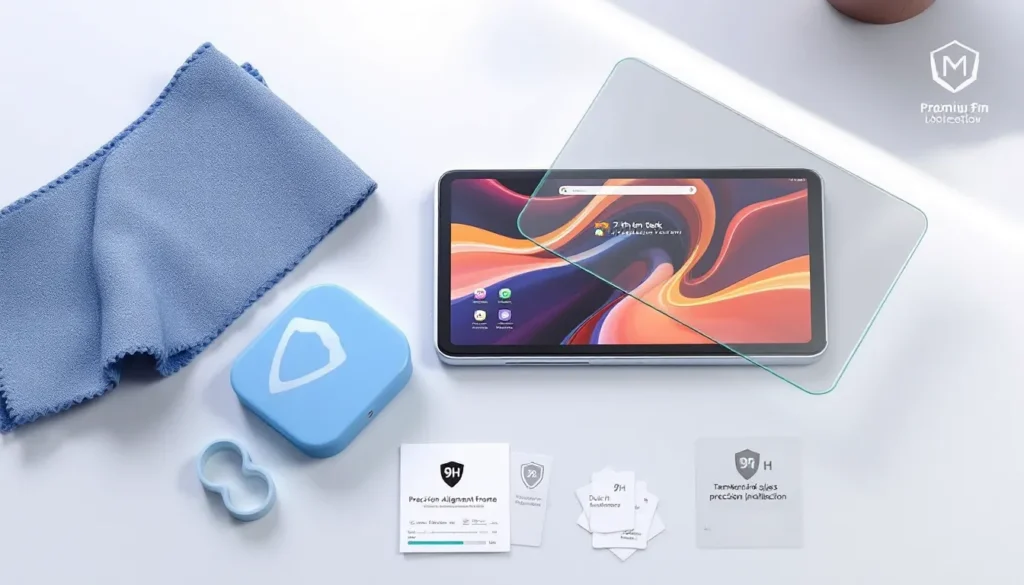
If installation is a nightmare, you’ll dread replacing a damaged protector, which means you might skip getting a replacement and leave your screen vulnerable. Quality protectors come with clear instructions, alignment tools, and generous margins for adjustment during installation. Some brands include multiple application attempts per package, which is thoughtful.
Look for protectors with oleophobic coatings that repel oils and dust, making installation cleaner and easier. Also confirm that the protector’s dimensions are precisely calibrated for the Deck’s screen to avoid overhang or gaps that collect debris.
How To Install A Steam Deck Screen Protector Correctly
Botched installation ruins even the best protector. Follow these steps to avoid bubbles, dust, and misalignment.
Preparation Steps
First, power down your Steam Deck completely and allow it to cool for a few minutes. A warm screen creates condensation, which traps air bubbles under the protector.
Gather your materials:
- Microfiber cleaning cloth (usually included)
- Distilled water or the adhesive spray your protector came with
- Dust removal stickers (often included in quality kits)
- A plastic squeegee or credit card for smoothing
Work in a clean environment, away from fans or open windows that kick up dust. Even small particles become visible under a screen protector and drive you crazy later.
Using the microfiber cloth, clean the Deck’s screen thoroughly. Wipe horizontally, then vertically, removing all fingerprints, dust, and oils. This step is non-negotiable, any grit left behind will create bumps under the protector.
If your protector kit includes pre-application liquid or sprays, apply it lightly to the screen now. This reduces adhesion tension, making the protector easier to reposition before it fully bonds.
Application Techniques
Remove the protector from its packaging carefully and peel back the protective film on one side. Align the protector with the Deck’s screen, starting from the top edge. Don’t press down yet, just let it rest gently against the glass.
Once aligned, slowly lower the protector onto the screen, pressing gently from the center outward. Work methodically toward the edges, using your fingers or a squeegee to guide it down smoothly. If you’re using liquid adhesive, you can slide the protector slightly to fine-tune its position before it fully bonds.
For film-based protectors, don’t rush this step. These materials can wrinkle if pressed unevenly. Take 30–60 seconds to align everything before committing.
Removing Bubbles And Ensuring Proper Adhesion
Small air bubbles are normal and usually disappear within 24 hours as the adhesive cures and temperature stabilizes. But, large bubbles or persistent air pockets need immediate attention.
Using a plastic squeegee (or a credit card wrapped in a soft cloth), gently press bubbles toward the edges of the protector. Work from the center outward in gentle, deliberate strokes. Don’t apply heavy pressure, you risk creating new bubbles or damaging the protector.
If a bubble refuses to disappear after light pressing, use a needle to poke a tiny hole at the bubble’s edge, allowing trapped air to escape. Immediately press that area down with the squeegee. This technique works better with film protectors than tempered glass, which can crack if stress-concentrated on a small point.
After installation, let your Deck rest for at least 2–4 hours (preferably overnight) before gaming. This allows the adhesive to fully cure. If you’re using a screen protector with liquid adhesive, 24 hours is safer to ensure complete bonding.
When you’re ready to use your Deck, fire up a graphically simple game like Balatro or Dorfromantik to test touch responsiveness before diving into demanding titles. This sanity check helps you catch installation issues early.
Best Steam Deck Screen Protectors Worth Considering
With hundreds of options available, narrowing down choices can feel overwhelming. Here are the standouts across different price points and preferences.
Premium Options
amFilm Tempered Glass (9H Hardness)
AmFilm’s offering is the industry standard for Deck owners. It offers exceptional clarity, responsive touch, and legitimate 9H hardness that resists real-world scratches effectively. The package includes a microfiber cloth, alignment frame, and dust removal stickers. Installation is straightforward, though slightly slower than budget alternatives.
Price: ~$25–$30 for a two-pack.
Pros: Outstanding durability, feels premium, widely available, excellent build quality.
Cons: Slightly thicker, may require certain cases to fit properly, higher price point.
Spigen Glas.tR
Spigen’s tempered glass protector balances durability with accessibility. It’s durable (9H), maintains excellent clarity, and comes in matte and glossy variants. The matte version specifically minimizes reflections in bright settings. Installation is user-friendly with included tools.
Price: ~$18–$22 for a two-pack.
Pros: More affordable than amFilm, matte option available, solid build quality, includes helpful installation tools.
Cons: Slightly lower scratch resistance than amFilm in some reports, occasional edge-lift issues with first generation units.
ESR Screen Protector for Steam Deck
ESR offers tempered glass options with military-grade durability certifications. Their protectors consistently receive praise for clarity and touch response. The self-alignment installation frame reduces placement errors significantly.
Price: ~$20–$26 for a two-pack.
Pros: Self-alignment frame is genuinely helpful, durability certifications are reassuring, reliable customer support, good value.
Cons: Slightly thicker than some competitors, may not fit all case types.
Budget-Friendly Alternatives
Maxjoy PET Film Protector
For players on a budget, Maxjoy delivers solid protection at an excellent price. It’s PET film rather than tempered glass, so it’s thinner and more flexible. Clarity is nearly identical to the original screen, and touch responsiveness is excellent.
Price: ~$8–$12 for a three-pack or four-pack.
Pros: Extremely affordable, easy installation, three or four protectors per package, minimal impact on touch responsiveness.
Cons: Less durable than tempered glass, prone to edge lift after months, doesn’t feel quite as premium, fingerprint magnet.
LoHi Screen Protectors
LoHi’s film protectors are another budget option with decent reviews. They use TPU rather than PET, offering slightly more durability than some competitors in the same price tier. Matte options are available.
Price: ~$7–$10 for a three-pack.
Pros: Very cheap, matte option reduces glare, adequate scratch resistance for casual players, easy to replace frequently.
Cons: Won’t match tempered glass durability, edge separation can occur, slightly reduces touch sensitivity in some reviews.
When choosing, consider your play style: If you’re someone who games daily, travels frequently, or tends to be rough on devices, tempered glass pays for itself through longevity and peace of mind. If you’re a casual player who treats the Deck carefully and wants to experiment with different finishes, budget film protectors offer excellent value. For gamers interested in exploring more accessories, the Top 5 Steam Deck guide provides complementary protection strategies.
Common Mistakes To Avoid
Even experienced users mess up screen protector installation or maintenance. Here are the pitfalls to sidestep:
Installing With Dirty Hands Or A Dusty Environment
This is the number one culprit behind bubbles and premature edge lift. Dust trapped under the protector is permanent, you can’t clean it out without reinstalling. Work in a clean room, wash your hands, and use the microfiber cloth provided before touching your Deck.
Forcing The Protector Down Aggressively
Tempting a protector to bond faster by pressing hard actually introduces air pockets and can warp film protectors. Trust the adhesive to do its job. Gentle, consistent pressure is always better than aggressive force.
Removing The Protector Too Soon
If your first installation isn’t perfect, resist the urge to rip it off immediately. Wait at least 10–15 minutes for the adhesive to begin setting. At that point, you can usually peel it back gently and reposition it without destroying the protector.
Using The Wrong Tools
Your fingernails, a hard credit card edge, or a paper towel aren’t ideal for smoothing protectors. The plastic squeegees included in quality kits are specifically designed to provide the right amount of pressure without damaging the protector. Use them.
Mixing Materials (Cheap Protector + Expensive Case)
A $10 film protector on top of a $50 protective case creates unnecessary incompatibility and bulk. Pick a protector that works with your existing case setup. When in doubt, check user reviews specifically mentioning your case model.
Neglecting The Screen Protector After Installation
Screen protectors aren’t truly “set it and forget it.” Minor edge peeling can progress into larger separation if ignored. Every few weeks, press the edges gently to ensure they’re still bonded. If you notice significant lifting, reinstall sooner rather than later.
Applying A Second Protector Over A Damaged One
This is tempting but misguided. Two damaged protectors together create worse results than one. Always remove the old protector completely before installing a new one, even if the old one is mostly intact.
Maintenance And Longevity Tips
A quality screen protector can last 6–12 months with proper care, though this varies based on use intensity and environment.
Cleaning Your Protector
Use a microfiber cloth and distilled water, never paper towels, paper napkins, or harsh chemicals. These materials scratch glass and strip coatings from film protectors. If your protector is especially grimy, add one drop of isopropyl alcohol to a damp cloth and wipe gently.
Clean your protector weekly if you game frequently outdoors. Dust and salt spray (if you game near ocean areas) accelerate wear.
Monitoring For Damage
Small scratches are cosmetic and don’t require replacement. But, if you notice cracks (especially on tempered glass), visible peeling, or persistent bubbles that won’t disappear, it’s time for a new one. A damaged protector stops providing real protection and can distract during gameplay.
Environmental Factors
Extreme temperature swings can cause adhesive to fail prematurely. If you’re gaming in a hot car, let your Deck cool before placing it in a cold bag. Similarly, don’t expose your Deck to rapid humidity changes, condensation under a protector doesn’t dry easily.
Replacement Strategy
With tempered glass protectors, you’ll typically get 12+ months before deciding to swap. Because they’re durable, replacement is optional, you only swap when you want a fresh look or if serious damage occurs. Film protectors degrade faster, so plan for replacement every 3–6 months if you game heavily.
Stocking spares of your preferred protector makes sense. Prices fluctuate seasonally, and your favorite brand might go out of stock. Buying in bulk (many brands sell multi-packs) is cost-effective and ensures you’re never without backup protection.
For broader Steam Deck accessory guidance, How-To Geek’s gaming setup tutorials offer practical advice on optimizing your entire Deck ecosystem. Also, PCMag’s gaming peripheral reviews provide in-depth evaluations of Deck-compatible accessories that complement screen protection. Understanding how protectors fit into your overall portable gaming strategy, alongside quality cases, docks, and stands, ensures you’re maximizing your investment.
Conclusion
Your Steam Deck’s screen is both its greatest strength and its biggest vulnerability. A $20 tempered glass protector or a $10 film alternative is genuinely cheap insurance that saves you from regret down the line. Whether you choose premium tempered glass for maximum durability or budget-friendly film for flexibility and cost savings, the key is picking something and installing it correctly.
The differences between brands often come down to ease of installation, included accessories, and durability certifications, not fundamental performance. Even mid-tier options from amFilm, Spigen, and ESR deliver solid protection without very costly.
Also, the right protector choice varies by how you use your Deck. A commuter who games on trains might prioritize a matte finish to reduce glare, while a couch gamer could opt for glossy tempered glass to maximize visual clarity in Baldur’s Gate 3. Neither choice is objectively “better”, it depends on your priorities.
The bottom line: invest in protection, install it properly, and maintain it thoughtfully. Your future self, and your resale value, will thank you. For comprehensive coverage of Steam Deck accessories and features, explore the Steam Deck Archives for additional guides on cases, docks, power supplies, and more. Whether you’re protecting your display or exploring upgrades, having the right tools ensures your handheld stays in peak condition for years of gaming.